

If you've sent out dozens of applications and heard nothing back — not even a rejection — the silence usually isn't about your qualifications. It's about a piece of software that never showed your resume to a human being in the first place.
That software is the Applicant Tracking System, or ATS: the database every mid-size and large employer now uses to collect, sort, and rank job applications before anyone on the hiring team reads them. Somewhere between 92% and 99% of Fortune 500 companies run one, and the share of mid-market companies using one is climbing every year. Understanding what this software actually does — and what it doesn't do — is the difference between a resume that gets read and one that quietly disappears.
Sources: Jobscan resume-screening research; SelectSoftwareReviews ATS statistics; The Ladders eye-tracking study. See the myth-busting note below before treating every ATS statistic as gospel.
Not sure why your applications are going quiet?
Take our free assessment to see how your resume and profile compare against what employers are actually screening for.
Take Free Assessment →1. The "75% Rejection" Myth, and What's Actually True
You've probably seen the claim that "75% of resumes are rejected by ATS before a human ever sees them." It gets repeated constantly, usually traced back to a 2012 Jobscan estimate that has been recycled without updated sourcing ever since. It's worth being honest about this, because believing the wrong version of the problem leads to the wrong fix.
A more recent, methodical look at the claim — including a search of peer-reviewed literature for any study that actually supports a hard "75% auto-reject" figure — turned up no academic research backing that specific number. What the same research did confirm is less dramatic but more useful: the large majority of ATS platforms don't silently discard resumes. They parse, score, and rank them, surfacing the highest-matching candidates to recruiters first and leaving the rest lower in a queue that a recruiter may or may not ever scroll to.
That distinction matters because it changes what "beating the ATS" actually means. You're not trying to sneak past a gate that either lets you through or slams shut. You're trying to rank near the top of a sorted list, because in a pool of 250+ applicants, only the top four to six typically get a human look before the req is filled or the recruiter moves on.
What isn't in dispute: nearly every large employer runs some form of automated screening, tailored resumes dramatically outperform generic ones, and formatting mistakes can make an otherwise strong resume unreadable to the parser — which has the same practical effect as rejection, even if "rejection" isn't technically what happened.
2. How an ATS Actually Reads Your Resume
Strip away the mystery and an ATS does three things, in order:
- Parsing — it converts your resume file into structured data: name, contact info, work history, dates, education, skills. If it can't map a piece of text to a field it recognizes, that text is effectively invisible, even if a human reading the same page would understand it perfectly.
- Matching — it compares the parsed data against the job requisition, usually by keyword and phrase overlap, sometimes with added weighting for years of experience, required certifications, or location.
- Ranking — it produces a score or sort order that determines whether a recruiter sees your application on page one or page eleven.
The most common reason a qualified candidate scores badly isn't a lack of relevant experience — it's a parsing failure. Multi-column layouts, text boxes, tables, headers/footers holding contact info, graphics standing in for section titles, and non-standard section headings ("My Journey" instead of "Experience") all break parsing in one system or another. The content might be excellent. The ATS just never sees it as content.

A parser doesn't "read" your resume the way a person does — it extracts fields into a database record. Anything it can't map to a field disappears.
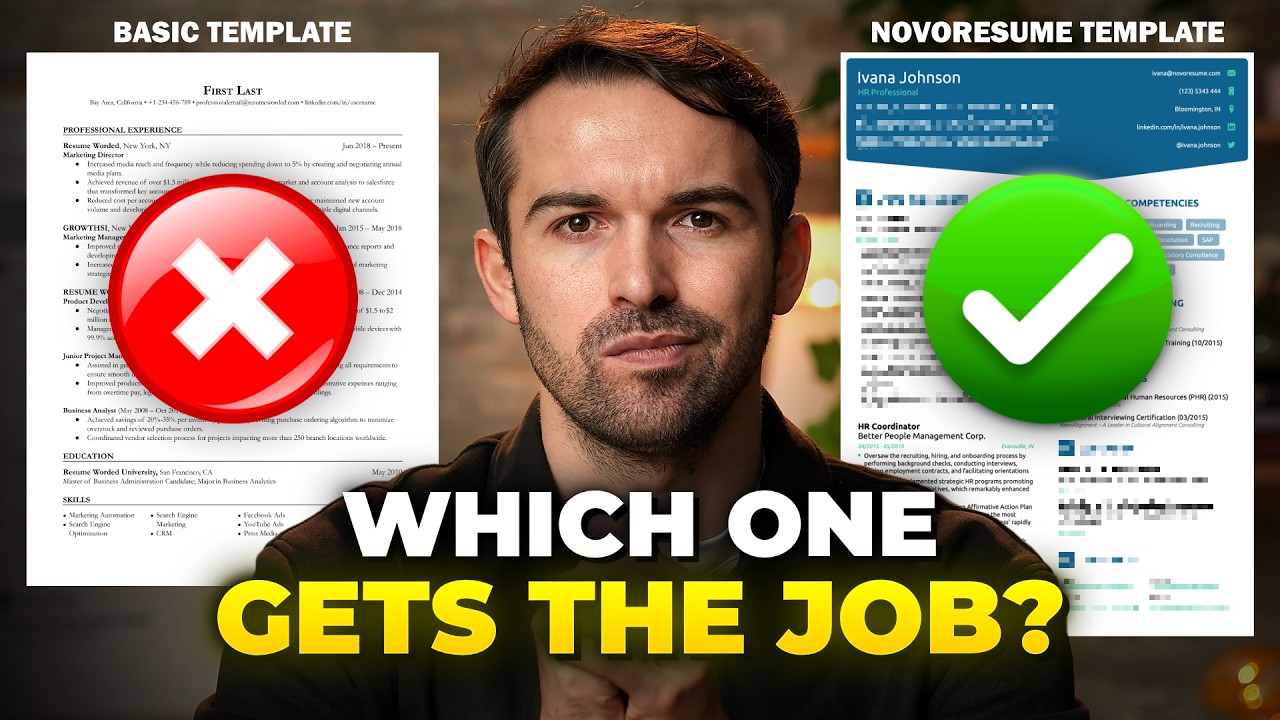
A walkthrough of common ATS parsing failures and how to structure a resume so the system reads it correctly the first time.
3. Formatting Rules That Actually Matter
Most ATS formatting advice online is either outdated or overcautious. Modern systems from Workday, Greenhouse, Lever, iCIMS, and Taleo — which together cover the large majority of enterprise hiring — have gotten better at parsing since the "no formatting at all" advice from a decade ago. Even so, a handful of rules still consistently hold up:
- Use a single column. Multi-column layouts can cause the parser to read across columns instead of down them, scrambling your work history into nonsense.
- Skip tables and text boxes for content that matters. A parser frequently can't extract text placed inside a table cell or a floating text box, especially contact information.
- Use standard section headings. "Experience," "Education," "Skills," "Certifications" — not creative alternatives. The parser is often looking for these exact words.
- Put contact info in the body, not the header/footer. Some parsers skip headers and footers entirely, which means a phone number or email placed only there is invisible.
- Save as .docx unless the posting specifies otherwise. Most ATS platforms parse Word documents most reliably. A PDF can work, but a scanned or heavily designed PDF is far riskier — if you need a polished visual version, keep a plain .docx for online applications and save the designed PDF for when you hand it to a person directly.
- Use standard fonts. Arial, Calibri, Georgia, and similar system fonts parse reliably. Custom or decorative fonts can render as garbled characters after parsing.
- Spell out abbreviations at least once. Write "Search Engine Optimization (SEO)" rather than just "SEO," since some systems match on the literal phrase in the job posting and won't recognize the abbreviation as equivalent.
None of this is about "gaming" anything. It's closer to accessibility: you're making sure the machine reading your document first can actually extract the information a human would need to make a decision later.
4. Keyword Strategy Without Keyword Stuffing
Keyword matching is real, but the version most people practice — cramming every possible term into a hidden white-text block or a wall of buzzwords at the bottom of the page — tends to backfire. Several current-generation ATS platforms flag resumes that show signs of manipulation, and a resume flagged this way can rank worse than one that simply used fewer, more accurate keywords.
A more durable approach:
- Mirror the job posting's exact phrasing for your core skills, not just a synonym. If the posting says "Program Management," use that phrase somewhere, not just "Project Management" — many parsers don't treat close synonyms as equivalent.
- Put keywords in context, inside real accomplishment bullets, rather than as a floating list. "Managed a $2M vendor budget using program-management frameworks to cut costs 15%" does the keyword-matching job and reads like a real sentence to the human who eventually opens the file.
- Build a dedicated Skills section that lists your core competencies plainly — this is one of the few places a short, scannable list actually helps rather than hurts, since many systems weight this section heavily.
- Tailor per application. The single highest-leverage habit in this entire guide: candidates who adjust their resume for each specific posting are reported to be roughly three times more likely to land an interview than those sending one generic version everywhere. Keep a detailed "base" resume, then copy and adjust it for each role rather than trying to write one document that works for everything.
🎧 Never Split the Difference — Chris Voss (Audiobook)
Written by a former FBI hostage negotiator, this is one of the most practical audiobooks for the negotiation conversation that happens after you land the interview — useful listening while you're tailoring resumes for your next round of applications.
Listen on Audiobooks.com →🖥 External SSD for resume/portfolio backups
Worth keeping every tailored version of your resume organized and backed up, especially if you're applying broadly. A compact portable SSD is cheap insurance against a lost laptop mid-search.
View on Amazon →Disclosure: Links above may be affiliate links. We may earn a commission at no extra cost to you.
5. Tools and Gear Worth Using
You don't need paid software to write an ATS-friendly resume, but a few tools genuinely reduce the guesswork:
| Tool type | What it's for | Notes |
|---|---|---|
| ATS resume scanners | Compares your resume against a specific job posting and flags missing keywords | Useful as a diagnostic, not a target to hit 100% — over-optimizing produces robotic-sounding bullets |
| Plain-text preview | Copy your resume into a bare text editor and see what survives | If a section disappears or scrambles in plain text, an ATS parser will likely struggle with it too |
| A second monitor or laptop stand | Comparing the job posting and your resume side by side while tailoring | Small ergonomic upgrade that speeds up the tailoring habit enough that you'll actually keep doing it |
The goal isn't a resume that scores 100% on every scanner. It's a resume a machine can read correctly and a person would still want to read after that.
5b. A Quick Cheat Sheet by ATS Platform
Not every ATS behaves identically, and you won't always know which one an employer uses until you're already in the application form. That said, the five platforms below cover most of enterprise hiring, and each has quirks worth knowing:
| Platform | Common in | Known quirk |
|---|---|---|
| Workday | Large enterprises, Fortune 500 | Often asks you to manually re-enter fields even after uploading a resume — fill these in fully rather than relying only on the parsed upload, since manual fields sometimes carry more weight in matching |
| Greenhouse | Tech companies, startups, scale-ups | Generally strong at parsing standard formats; structured data (skills, dates) matters more here than keyword density |
| Lever | Tech and mid-size companies | Surfaces resumes to recruiters in a visual card view — a clean summary line near the top of your resume gets noticed even before a recruiter opens the full file |
| iCIMS | Large enterprises, staffing agencies | Actively flags manipulation tactics like hidden white-text keyword blocks — a flagged resume can rank below one that used fewer keywords honestly |
| Taleo | Older enterprise deployments, government-adjacent employers | One of the least forgiving parsers for complex formatting; when in doubt, default to the simplest possible layout for these applications |
You can often guess the platform from the application URL itself (myworkdayjobs.com, greenhouse.io, jobs.lever.co, icims.com, taleo.net are common giveaways) — worth a quick glance before you decide how much formatting risk to take.
5c. Before and After: Rewriting a Weak Bullet Point
Keyword placement matters, but so does the actual sentence you build around it. A bullet can contain every right keyword and still fail to demonstrate impact — and impact is what gets a resume read past the first ten seconds once it reaches a person. A few real-style examples:
Before: "Responsible for managing customer accounts and resolving issues."
After: "Managed a portfolio of 40+ enterprise customer accounts, resolving an average of 25 support tickets weekly and improving customer retention by 18% year over year through proactive account reviews."
Before: "Helped with social media marketing for the company."
After: "Built and executed a social media content calendar across three platforms, growing follower count 3x in six months and driving a 22% increase in inbound leads attributed to organic social."
Before: "Worked on the finance team doing budgeting tasks."
After: "Managed a $2.4M departmental budget, identifying cost-saving opportunities that reduced annual spend by 15% through vendor renegotiation and process consolidation."
Notice what changed in each case: a number, a scope (how many accounts, how many platforms, how large a budget), and a result. This pattern — scope plus number plus outcome — does double duty. It satisfies the human reader's need for evidence, and it naturally creates the kind of specific, quantified language that both recruiters and parsers respond to, without reading like a keyword list bolted onto a sentence.
5d. Handling Employment Gaps and Career Pivots on an ATS-Friendly Resume
If you have a gap in your work history or you're applying into a different field than your most recent job, resist the urge to hide it with vague date ranges or omitted employers — inconsistent or missing dates are themselves a common parsing and credibility problem. Instead:
- List gaps honestly with year-level precision if month-level detail isn't relevant ("2023–2024" rather than leaving a blank space in the timeline).
- If the gap involved caregiving, further study, freelance work, or a business you were building, give it a one-line entry in the Experience section rather than leaving it invisible — a parser (and a recruiter) generally responds better to an accounted-for timeline than an unexplained hole.
- For a career pivot, lead your summary section with a plain-language statement of the shift ("Marketing professional transitioning into data analytics, with completed coursework and two applied projects in SQL and Python") so both the parser and the human reader immediately understand the frame, instead of guessing why your most recent title doesn't match the job you're applying for.
We cover the full career-change process — including how to reframe transferable skills for an ATS and a recruiter simultaneously — in our companion guide on changing careers in 2026.
5e. Common ATS Myths You Can Stop Worrying About
Job search forums are full of ATS folklore, some of it outdated and some of it simply wrong. A few of the most persistent myths, and what the evidence actually supports:
Myth: "The ATS rejects you the moment you hit submit."
Reality: in the large majority of cases, your resume is scored and queued, not instantly discarded. Whether a human ever opens it depends on how many other applicants scored higher, how quickly the recruiter is working through the queue, and whether the role gets filled or paused before they get to you. A lower score reduces your odds; it doesn't guarantee exclusion the way "rejection" implies.
Myth: "You need to match the job description word-for-word to pass."
Reality: exact-phrase matching helps for specific, named skills and certifications (a required software platform, a licensure), but forcing every sentence to mirror the posting produces a resume that reads as robotic to the human reviewer who eventually opens it. Match precisely on hard requirements; write naturally everywhere else.
Myth: "A one-page resume is mandatory no matter your experience level."
Reality: length guidance is really about density, not a hard page count. A crowded one-page resume with 9-point font is harder for both a parser and a person to extract value from than a clean two-page resume with room to breathe, if you genuinely have ten-plus years of relevant history to show.
Myth: "Once your resume is optimized, you're done — just keep applying."
Reality: even a well-optimized resume degrades in effectiveness against a specific posting the more generic it is. The candidates seeing the best response rates are consistently the ones re-tailoring their existing base resume for each role, not the ones who wrote one "perfect" version and stopped adjusting it.
Myth: "Applicant Tracking Systems are only used by huge corporations."
Reality: adoption has moved well past the Fortune 500. Mid-market companies, agencies, and even some smaller employers now use low-cost or free ATS tools bundled into their job-board postings, which means the formatting advice in this guide applies to a much wider range of applications than most job seekers assume.
6. The Pre-Submit Checklist
Before you click submit on any application, run through this list. It takes about three minutes and catches the mistakes that cause the most silent rejections:
- File saved as .docx (or PDF only if the posting explicitly allows/prefers it)
- Filename follows a clear pattern, e.g. "FirstName_LastName_JobTitle_Resume"
- Single-column layout, no tables or text boxes holding key content
- Standard section headings (Experience, Education, Skills)
- Contact info in the main body, not header/footer only
- Job title and 3–5 core keywords from the posting appear naturally in your bullets
- Dates formatted consistently (Month Year – Month Year) throughout
- No tracked changes, comments, or hidden text left in the document
- Read once more in a plain-text editor to confirm nothing scrambled
- You're getting more replies, even rejections, instead of total silence
- Recruiters mention specifics from your resume in outreach messages
- You're spending more time tailoring fewer applications and it's paying off
- You're still sending one identical resume to every posting
- Your resume uses a heavily designed template with columns or graphics
- You've never tested how your resume parses in plain text
Frequently Asked Questions
Not from scratch. Keep one detailed "master" resume with every relevant accomplishment, then spend 10–15 minutes adjusting the top third and the keyword phrasing for each posting. That's enough to capture most of the benefit without redoing the whole document each time.
It's riskier, not impossible. Some modern parsers handle two-column layouts fine; others scramble the reading order. If you like a two-column design, keep your work history and skills — the sections that matter most for matching — in the wider, primary column, and use the narrow column only for things like a headline or contact icons that aren't critical to parsing.
No — avoid this entirely. Several major ATS platforms specifically detect this technique and can flag or down-rank a resume for attempted manipulation, which is a worse outcome than simply not including the keyword at all.
AI tools can help you draft and tighten bullets, but they can't verify your actual accomplishments or numbers — that part is on you. Use them for phrasing and structure, then fact-check every claim yourself before submitting.
One page for early-career candidates, one to two pages for most mid-career professionals, and two pages is generally fine for senior or highly technical roles with a long relevant history. Length matters far less than whether the content on each page is easy for both a parser and a person to extract quickly.
Often, yes. Job boards can create duplicate records or route applications through an aggregator layer before they reach the employer's actual ATS, occasionally causing formatting or parsing issues that don't happen when you apply directly on the company's careers page. When you have the choice, applying direct is usually the more reliable path.
It can be, especially if you've sent out a large number of tailored applications with a low response rate and can't identify why. A second set of eyes — human or a well-built scanning tool — often catches formatting or phrasing issues that are invisible to the person who wrote the document. It's not a requirement for everyone, though; many candidates can self-diagnose using the plain-text preview method and the checklist above.
Before You Hit Submit: A Few Final Thoughts
It's easy to treat the ATS as an adversary — something to trick, outsmart, or sneak past. That framing isn't wrong exactly, but it points people toward the wrong fixes: hidden text, keyword stuffing, gimmicky formatting tricks copied from a forum post with no source behind it. The candidates who consistently get through aren't the ones who found a clever hack. They're the ones who treated the process like what it actually is — a filter built to reward clarity, relevance, and specificity — and then simply gave it what it was designed to look for.
That means a clean, single-column document. Section headings the software recognizes. Bullets that lead with real numbers instead of vague duties. And, more than any single formatting trick, the discipline to tailor your application to the specific role in front of you rather than sending the same file to fifty postings and hoping volume makes up for precision. None of it is complicated. Most of it is just tedious enough that a lot of candidates skip it — which is exactly why doing it consistently is still a real advantage in 2026.
Ready for a second opinion?
Get matched with roles that actually fit your background — take our free career assessment and we'll help you understand where your resume and profile stand today.
Take Free Assessment →